Destinations › Asia › Nepal
momos, mountains and full bars.
eSIM for Nepal
For Nepal, a 5 GB eSIM valid 30 days covers two weeks of maps, WhatsApp and photos for one person. It runs on both NT Mobile and Ncell, so you keep signal in more trail villages. Install it at home on Wi-Fi; it starts when you land in Kathmandu.
✓ Both Nepal networks · when one drops, we don't
- 💳Card, Apple Pay, Google Paysecure payment by Stripe
- 🏢Registered companyCNPJ 20.737.210/0001-74
- ↩Refund guaranteedif your eSIM won't install
- 📶4G networksNT Mobile and Ncell
plan the trip with names you already know





 AmexApple PayGoogle Pay
- ⚡Delivered in secondsQR code on screen and by email, right after payment.
- 🛬Starts when you landYour days count from the first connection in Nepal.
- 💬Keep your WhatsAppSame number, same chats. Data only: no local number.
- ↩︎Refund if not installedAsk from your order page within 7 days.
we don't let go
Two networks. When one drops, we don't.
Ncell is fast in Kathmandu and Pokhara but loses signal sooner on the trails; Nepal Telecom keeps going higher. Most Nepal eSIMs connect to just one of them. Yours connects to both and switches to whichever has signal.
Where each network works on the treks ›| Nepal eSIM | Networks it can use |
|---|---|
| Hopmundo | ✓✓ NT Mobile + Ncell |
| Airalo | Ncell only |
| Nomad | Ncell only |
| Holafly | Nepal Telecom only |
Networks as listed by each seller for Nepal, checked 22 November 2026.
How much data do I need?
| Maps, WhatsApp, a few photos | ≈ 0.3 GB a day | 3–5 GB for two weeks |
| Plus social media and video calls | ≈ 0.7 GB a day | 10 GB for two weeks |
| Streaming, hotspot for a laptop | 1 GB+ a day | Unlimited plan |
Ran out? Top up the same eSIM at hopmundo.com/top-up: more data on a data plan, more days on unlimited, nothing to reinstall.
Network and coverage
Your eSIM connects to NT Mobile (Nepal Telecom) and Ncell, and switches to whichever has signal. On trekking routes that matters: where one network drops, the other often still works.
- ●Kathmandu, Pokhara, Chitwan and Lumbini: 4G on both networks.
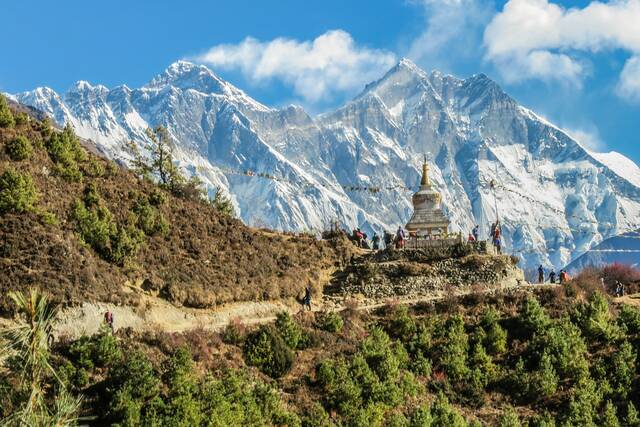
- ●Everest and Annapurna trails: signal in most villages along the main routes, patchy or none on high passes and in remote valleys.
- ●Remote treks (Upper Dolpo, Manaslu side valleys): expect long stretches without any network.
AmexApple PayGoogle Paythe Nepal notebook
Before you fly
Nepal issues visas on arrival at Kathmandu airport. Fill in the online arrival form before you fly to skip part of the queue.
Most treks need permits, and foreigners now trek with a licensed guide on most routes: book through a registered agency.
Teahouses charge for Wi-Fi and charging, and cold drains batteries fast. Bring a power bank and keep the phone in an inside pocket.
ATMs are easy in Kathmandu and Pokhara, scarce on the trails. Take enough rupees before you set off.
Sockets are mostly type C, D and M (230 V). A universal adapter saves the day.
- Pay by card: the QR code shows on screen and lands in your inbox.
- On iPhone, tap “Install”. On Android, scan it in Settings › Connections › SIM manager.
- When you land, turn on data roaming for the eSIM line.
addresses worth the detour
Where to eat in Kathmandu
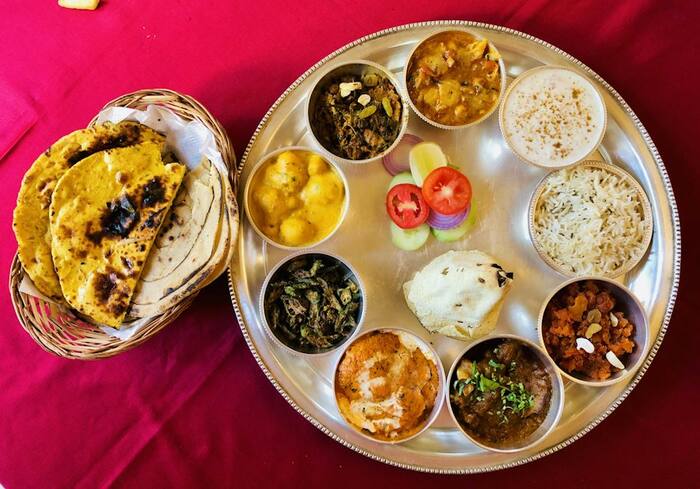
Bhojan Griha
Dilli Bazaar · Nepali and Newari · $$$
A set Nepali feast with dance shows, in a restored mansion built for a royal priest more than 150 years ago.
📍 Dilli Bazaar, Kathmandu

Fire & Ice Pizzeria
Thamel · Italian · $
The pizza every trekker talks about on the way back from the mountains, and a favourite with locals too.
📍 Sanchaya Kosh Bhawan, Tridevi Marg, Thamel

OR2K
Thamel · vegetarian · $
Floor cushions, Middle Eastern plates and big salads: a light change after weeks of dal bhat.
📍 Thamel, Kathmandu
Photos show a typical dish, not the restaurant itself.
How to install and connect
Step 1 of 9
Open Settings
Install on Wi-Fi, ideally before you fly. Menu names can vary a little by model.
the eSIM is just the start
Prepare the whole trip here
What to sort out before you fly.
Visas and permits
Visa on arrival in Kathmandu, trekking permits, who needs a visa for Mongolia.
From checkout to the arrivals hall, no drama
Pick your plan and days
Fixed data or unlimited by the day. We tell you how much you'll need.
Pay by card
Visa, Mastercard, Amex, Apple Pay or Google Pay, in US dollars.
Install in one tap
QR code on screen and by email. On iPhone, just tap Install.
Land and connect
Turn on data roaming for the eSIM line. That's it.
one eSIM for every phone in the group
For the whole crew
Buy up to six in one go: each phone gets its own QR code, nobody hunts for Wi-Fi at the guesthouse.
read before you go
Nepal connectivity guides
Nepal eSIM questions
Will it work on the Everest Base Camp trek?
In most villages along the trail, yes, because the eSIM uses both NT Mobile and Ncell. Between villages and above about 5,000 m coverage is patchy on every network, local SIMs included.
Which network does the Nepal eSIM use?
Both of Nepal's networks: NT Mobile (Nepal Telecom) and Ncell. Your phone connects to whichever has the better signal, which matters on the treks, where Ncell often drops out before Nepal Telecom does. Many Nepal eSIMs use only one of the two.
Do I get a Nepali phone number?
No. It is a data-only eSIM: WhatsApp, maps, calls over apps and browsing work, but there is no local number for regular calls or SMS. Your home SIM stays in the phone for texts.
What if I run out of data?
Top up the same eSIM at hopmundo.com/top-up (or from the link in your email): more data on a data plan, or more days on an unlimited plan. It is added in about a minute, with no new QR code and nothing to reinstall. A data plan can't be switched to unlimited later, so if you expect heavy use, start with an unlimited plan.
When does my plan start?
On your first connection in Nepal, not on purchase. Install it before you fly, switch it on when you land.
Plans, networks and coverage checked .
real people on the other side
Stuck installing? Write to us.
We answer every day. If your eSIM won't install, we fix it with you or give your money back.